

Receiving a Vanilla gift card can be exciting, but if you’ve ever tried to use it on Amazon, you may have run into some confusion. Unlike traditional Amazon gift cards, Vanilla cards (Visa, Mastercard, or OneVanilla) are prepaid debit cards, which means they don’t always work like regular credit or debit cards. This leaves many users wondering: how do I use a vanilla gift card on Amazon?
The short answer is yes, you can use Vanilla gift cards on Amazon, but there are two main methods: either adding the card directly as a payment method during checkout or converting it to your Amazon gift card balance first. Both approaches have their pros and cons, and understanding them will help you avoid declined transactions or leftover balances.
In this guide, updated for 2026 Amazon policies, we’ll walk you through everything you need to know about using a Vanilla gift card on Amazon, from activation and balance checks to step-by-step instructions for both methods. By the end, you’ll be able to confidently shop on Amazon using your Vanilla card without any guesswork.
Understanding Vanilla Gift Cards
What is a Vanilla Gift Card?
A Vanilla Gift Card is a prepaid debit card designed for flexible spending, both online and in physical stores. Unlike store-specific gift cards, Vanilla cards run on major payment networks, allowing them to be used at thousands of merchants worldwide.
The most common types include:
-
Vanilla Visa: Preloaded with a fixed dollar amount and accepted anywhere Visa payments are supported.
-
Vanilla Mastercard: Functions similarly to Vanilla Visa, but operates on the Mastercard network, which may affect acceptance at certain merchants.
-
OneVanilla: Available in both physical and digital formats, making it especially popular for online shopping and digital services.
Vanilla gift cards differ significantly from traditional debit or credit cards. They are not linked to a bank account, cannot be reloaded, and do not allow ATM withdrawals. This also sets them apart from Amazon gift cards, which are restricted to Amazon purchases only and cannot be used elsewhere.
Key Features of Vanilla Gift Cards
-
Wide acceptance: Works at most merchants that accept Visa or Mastercard.
-
Non-reloadable: The balance is fixed and cannot be topped up.
-
Purchase-only use: No cash withdrawals or peer-to-peer transfers.
-
Activation required: Most cards must be activated before use, either automatically at checkout or online.
Understanding these features and limitations is essential—especially when attempting to use a Vanilla gift card on Amazon—because the process differs from applying a standard Amazon gift card balance.
Can You Use Vanilla Gift Cards on Amazon?
So, can you use Vanilla gift cards on Amazon? Yes—but not in the same way you use an Amazon gift card. Amazon does not allow Vanilla gift cards to be added directly to your Amazon gift card balance. Instead, Amazon treats Vanilla gift cards as standard Visa or Mastercard payment methods, meaning they must be added to your account like a regular debit or credit card.
Because Vanilla gift cards are prepaid, there are several important limitations to keep in mind. First, the card must have enough balance to cover the full purchase amount, including tax and shipping. Amazon generally does not allow you to split a single order between a prepaid card and another payment method unless part of the total is already covered by your Amazon gift card balance.
Second, Amazon requires a billing address that matches the one registered to the Vanilla card. If the card is not registered online with an address, transactions may fail even if sufficient funds are available.
To improve your chances of success, follow best practices: activate the card immediately after purchase, register it with a valid billing address, and check the remaining balance before placing an order. Taking these steps helps prevent declined payments and ensures smoother checkout when using a Vanilla gift card on Amazon.
Before You Start: Pre-Purchase Checklist
Before attempting to use your Vanilla gift card on Amazon, it’s important to complete a few essential steps. Skipping any of these can lead to payment errors or declined transactions, even if the card still has funds available.
Activate Your Card
Start by confirming that your Vanilla card is activated. You can do this by calling the phone number printed on the back of the card or by visiting the official Vanilla activation website. Some cards are activated automatically at checkout, while others require manual activation. Keep in mind that certain online purchases may not work immediately—there can be a 24-hour waiting period after activation before the card is accepted for e-commerce transactions.
Check Your Balance
Next, visit VanillaGift.com to check your current balance. Amazon requires the card to cover the full purchase amount, including tax and shipping. Knowing your exact available balance helps you avoid failed payments caused by being even a few cents short.
Register Your Card
Registering your Vanilla card online is one of the most critical steps. Registration links the card to a billing address and ZIP code, which Amazon uses to verify payments. To register, go to the card’s website, enter your card number, expiration date, and CVV, then add your billing information.
By activating your card, confirming the balance, and registering it with a billing address, you greatly reduce the risk of checkout errors and ensure a smoother Amazon shopping experience.
Method 1: Add Vanilla Card as a Payment Method (Direct Use)
When to Use This Method
Adding your Vanilla gift card directly as a payment method on Amazon is best for one-time purchases where the item price (including tax and shipping) closely matches your card balance. This approach is fast and convenient, making it ideal if you want to spend the card in a single transaction. However, it can become problematic if your order total exceeds the available balance, since Amazon usually won’t allow split payments with prepaid cards.
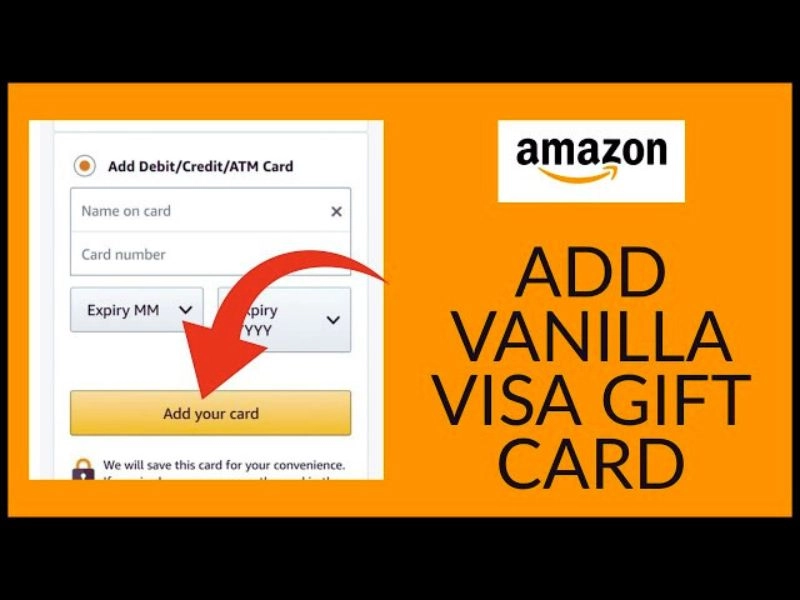
How to Add a Vanilla Card on the Amazon Website
-
Go to Your Account and select Your Payments.
-
Click Add a payment method, then choose Add a credit or debit card.
-
Enter your Vanilla card details, including the card number, expiration date, CVV, and the name printed on the card (or your own name if none is listed).
-
Carefully verify that the billing address and ZIP code match the address you registered with the Vanilla card.
-
Save the card to your account.
How to Add a Vanilla Card on the Amazon Mobile App
-
Open the Amazon app and sign in.
-
Tap Account, then select Your Payments.
-
Tap Add a card and enter your Vanilla card information.
-
Confirm or edit the billing address so it matches the registered address on the card.
-
Save the card.
Making a Purchase
Once the card is added:
-
Add your desired items to the cart.
-
Proceed to checkout and select your Vanilla card as the payment method.
-
Double-check that the order total does not exceed your card balance.
-
Place the order to complete the purchase.
Pros and Cons
| Pros | Cons |
|---|---|
| Quick and simple setup | Cannot easily split payments |
| No extra conversion steps | Small leftover balances can be difficult to use |
| Ideal for single purchases | Transactions may be declined if the balance is even slightly insufficient |
Method 2: Convert to Amazon Gift Card Balance (Recommended)
Why This Method Is Better
Converting your Vanilla gift card into an Amazon gift card balance is the most reliable and flexible way to use it on Amazon. Instead of dealing with prepaid card restrictions at checkout, you transform the balance into Amazon credit that works seamlessly across the platform.
This method offers several clear advantages. You can combine your Amazon balance with other payment methods, such as credit cards or debit cards, without restrictions. It also eliminates the common problem of leftover balances, since Amazon gift card credit can be used down to the last cent. Additionally, Amazon balances never expire, giving you full flexibility for future purchases. Finally, all spending is clearly tracked in your Amazon account, making it easier to monitor and manage.
Step-by-Step Process
Option A: Reload Amazon Balance Directly
-
Click Reload Your Balance.
-
Enter an amount that closely matches (or exactly equals) the balance on your Vanilla card.
-
Select your Vanilla card as the payment method.
-
Complete the transaction and submit the reload.
-
Wait a few moments for the balance to update—this is usually instant but can occasionally take a few minutes.
This option is the fastest and cleanest method when it’s available for your account.
Option B: Purchase an Amazon eGift Card
If balance reload isn’t available or fails, purchasing an eGift card is a dependable alternative:
-
Search for an Amazon eGift Card on Amazon.
-
Select a gift card value that matches your Vanilla card balance.
-
Choose email delivery and enter your own email address.
-
Pay using your Vanilla gift card.
-
Check your email for the Amazon gift card code.
-
Redeem the code in your Amazon account to add the balance.
Using Your Amazon Balance
Once added, your Amazon gift card balance is automatically applied at checkout. You can freely combine it with other payment methods, avoid prepaid card declines, and track all activity through your Amazon account—making this the safest and most recommended approach.
Pros and Cons
| Aspect | Description |
|---|---|
| Pros | Maximum flexibility: use funds on any item and combine with other payment methods. No risk of leftover balance. Can split payments across multiple purchases. Easier to track spending in your Amazon account. |
| Cons | Requires an extra step to convert the card to an Amazon balance or purchase an eGift card. Small processing time before the balance is fully updated, so immediate use isn’t always possible. |
Troubleshooting Common Issues
Card Declined / Not Accepting
If your Vanilla card is declined or not accepted on Amazon, first verify that the card has been activated and that it has a sufficient balance for your purchase. Make sure the billing address matches the one used during registration and check that the card hasn’t expired. If the issue persists, try using a different browser or clearing your cache before attempting the transaction again. Insufficient Funds Error
An Insufficient Funds Error occurs when your purchase exceeds the balance on your Vanilla card. Additionally, pre-authorization holds may temporarily reduce the available balance, causing the transaction to be declined. The recommended solution is to use Method 2 and convert the card to your Amazon balance, which ensures the full amount can be applied without issues.
ZIP Code / Billing Address Issues
Amazon requires a registered billing address for Vanilla gift cards, and any mismatches can prevent the card from being accepted. To resolve this, update your card’s registration information to ensure the billing address matches what Amazon has on file.
Card Not Appearing at Checkout
If your Vanilla card is not appearing at checkout, allow a few minutes after adding it to your account. You can also try refreshing the page, logging out and back in, or checking your saved payment methods to ensure the card is properly registered.
Cannot Split Payment Error
Amazon restricts splitting Vanilla card payments, which means you cannot combine the card directly with other credit or debit cards during checkout. A simple workaround is to first convert the Vanilla card to your Amazon balance, allowing you to use the funds more flexibly and combine them with other payment methods if needed.
Email Delays for eGift Cards
When using a Vanilla card to purchase Amazon eGift Cards, email delivery typically takes a few minutes, though it can sometimes take longer. Be sure to check your spam or junk folders, and contact Amazon support if the email delay persists.

Important Limitations and Restrictions
What You Cannot Buy
Vanilla gift cards cannot be used to purchase an Amazon Prime membership, digital subscriptions such as Kindle Unlimited or Amazon Music, recurring payments, or certain items sold by third-party sellers.
Payment Restrictions
Vanilla gift cards cannot be combined directly with other credit or debit cards unless you use Method 2 to convert the balance. They also cannot be used to withdraw cash, and the maximum purchase amount is limited to the card’s available balance.
Time Restrictions
After activating a Vanilla gift card, there is typically a 24-hour waiting period before it can be used for online purchases. While the cards usually have an expiration period of around 9 years, the funds on the card generally do not expire.
Geographic Restrictions
US-issued Vanilla cards can only be used on Amazon’s US website. Regional limitations may also apply to international accounts, so users outside the US may encounter restrictions when trying to use these cards.
Tips for Maximizing Your Vanilla Gift Card Value
-
Check the balance before every purchase.
-
Convert the entire balance to the Amazon account for flexibility.
-
Use for essential purchases to avoid wasting small amounts.
-
Combine multiple cards by converting each separately.
-
Track small leftover balances carefully.
-
Use the remaining balance before expiration.
-
Register immediately upon receipt to prevent errors.
Final Thoughts
So, how do I use a vanilla gift card on Amazon? There are two main methods: adding it directly as a payment method or converting it to your Amazon gift card balance. While direct use works for simple, one-time purchases, converting the card to an Amazon balance is the recommended approach for maximum flexibility and no leftover funds.
Remember to activate your card, check the balance, and register your billing address before making a purchase. Once set up, using a Vanilla gift card on Amazon becomes straightforward. By following these steps, you can enjoy the full value of your prepaid card and make the most out of your shopping experience.
Next time you receive a Vanilla gift card, try converting it to your Amazon balance first—it’s simple, efficient, and ensures you never lose a cent.
FAQs
1. How long does it take for my Vanilla card to work on Amazon?
Activation and registration may take a few minutes, but some online purchases require a 24-hour waiting period.
2. Can I use multiple Vanilla gift cards for one purchase?
Directly no, but convert each card to your Amazon balance and combine them at checkout.
3. What happens to the leftover balance on my Vanilla card?
If unused, it stays on the card until the expiration date; converting to an Amazon balance avoids waste.
4. Can I return items purchased with a Vanilla gift card?
Yes, refunds go back to your original payment method or Amazon balance.
5. Is it safe to use Vanilla cards on Amazon?
Yes, as long as the card is activated and registered, and the billing info matches. Avoid sharing card numbers publicly.
